|
|
|
WHAT IS |
|
|
|
|
|
|
|
|
|
HOW TO |
AUTHOR
Burn
(S)VCD,DVD
menu,photo album |
|
|
|
|
|
|
|
|
|
|
|
OTHER |
|
|
|
|
|
|
|
|
|
|
|
|
|
|
|
|
|
|
|
|
|
|
|
|
|
|
|
|
|
| |
| How to
Play on the computer and how to watch on the TV |
|
|
|
|
|
These guides describes how to watch and play
VCD, SVCD, DVD or DivX on your computer and also how to use
the TV-Out that many videocards has nowadays.
Use
the links above here to navigate.
in Windows
You can
play VCDs with Windows
Media Player, insert the VCD and locate the dat file in
the MPEGAV folder and open it. With some really good player
like PowerDVD
or Cinematograph it's
just to insert the VCD and hit play and it will autoplay the
VCD. Use a low resolution, like 640x480, on the monitor
when watching a VCD to get best quality.If you have
problems playing VCDs on your computer read this.
in Mac
Play VCDs with MacVCD, it does
also support MacOS X.
in Linux
Play VCDs with
MpegTV Player
or Videolan.
| How to play a SVCD,
MPEG2 |
in Windows
To play a
SVCD you need a software
DVD Player, open the .MPG file in the MPEG2 or MPEGAV
folder with any player like PowerDVD
or WinDVD(WinDVD
autoplays and support SVCD menus also). To play MPEG2 with Windows
Media Player you need a software DVD Player installed.
in Mac
Play SVCDs with ?. For MacOS X checkout Videolan.
in Linux
Play SVCDs with Videolan.
in Windows
To play a
DVD you need a software
DVD Player, then it is just to insert the DVD and hit Play
using any player like PowerDVD
or WinDVD. And
You NEED a DVD-ROM to be able to read DVDs on Your
computer.
To play MPEG2 with Windows
Media Player you need a software DVD Player
installed.
To
play a copied/ripped DVD from you HD you should have also
copied the .ifo from the DVD to where you copied the
vobs and then it's possible to play the DVD as usual with the
Cinematograph DVD
Player, just open the .ifo and you can acces all
menus,audio tracks and subtitles. It is also possible to use WinDVD, rip the
entire DVD folder VIDEO_TS with for example Smartripper to a
folder called VIDEO_TS on any harddrive root like F:\VIDEO_TS.
Then start WinDVD and select F: as the DVD Drive.
in Mac
Play DVDs with Apple DVD
Player. For MacOS X
checkout Videolan.
in Linux
Play DVDs
with Videolan.
in Windows
To play
DivX or AVI you first
need to install the DivX
codecs, you find the DivX codec under ther Tools
page. Then you should be able to play the video with
Windows Media Player. It's also possible that you need to
install the Kristal Studio Pack Codecs, also availabe under
the Tools
page. If you
still have problem try then to "fix" the DivX, beceause the
DivX can have been broken while you downloaded it, read here how to fix
a DivX/AVI.
in Mac
Play DivX with
DivX Player.
For MacOS X checkout DivOSX
in
Linux
Play DivX with MPlayer.
| How to watch movies on your TV
with the computer |
To watch VCDs,SVCDs and DVDs it's best to buy a
stand alone
DVD Player but you can also watch them from your computer
to the TV with a TV-Out device. Many videocards today have
TV-Out but the quality isn't superb. One of the best TV-Outs
has the Matrox G400 cards. Or you can get a MPEG-Card like Hollywood
+ or Creative
DXR3. The quality of MPEG-Cards video playback is compared
with stand alone DVD Players. But remember that MPEG-cards
only defaults play MPEG/MPEG2/VCD/DVD, to play DivXs and
MOV you must have a very fast computer and special player,
read more here.
Another
method to watch movies from your computer is to use a 'VGA to
PAL/NTSC Scan converter'. These converters have a VGA pass
through so the signal can be watched both on a PC monitor and
on a TV. There are many such
products available (in the US. I am not sure about other
countries) Below is a list of scan converters for your
information. A. Scan Converter:
I. ADS Technologies http://www.adstech.com 1. TV
Elite XGA 2. TV Superscan 2
II. Aitech
International http://www.aitech.com/retail.htm 1. Pocket Scan
Converter 2000 2. MultiPro 2000 with Mouse Remote
III.
Antec
http://www.antec-inc.com/product/tv_pc_converter/pro_tv.html
1. TVator Remote II 2. TVator EXEC
IV. Avermedia
http://www.avermedia.com/products/presentation.html 1. AVerKey
iMicro 2. AVerKey3 Plus 3. AVerKey300 Gold 4. AVerKey500
Pro
V. Focus Enhancements http://www.focusinfo.com/ 1.
TView Gold 2. TView Gold PCI 3. TView Micro XGA 4. TView
Silver
From what I have read in the newsgroups, is that
the scan converter gets a better quality to your TV than a
TV-out video card does.
Common TV-Out
Problems
Black and
White picture
If you have
connected with a SVHS-cable be sure that your TV support SVHS,
if not then get a composite-cable. And be sure that you have
selected correct system, like PAL or NTSC on the
Videocard/MPEG-Card.
Small picture on the TV with
big black borders
If you have TNT/TNT2/GEFORCE/GEFORCE2
then get TVTool to fix that
problem.
Can I play DivX/nAVI/ASF/SMR on my
Hollywood + / DXR3 / Stand alone DVD Player?
No
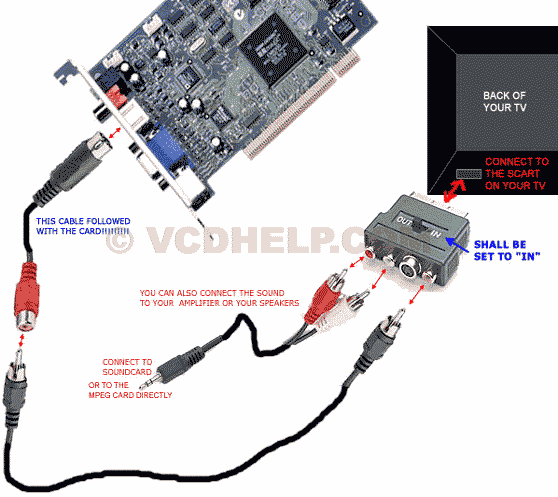
How to connect
from the computer to the TV
Connect the cables as the picture shows(the
picture show a Hollywood + card but you could connect almost
the same with all tvout-cards). The only cable that
follows with the card is the short S-vhs to
RCA-cable.
If you have a TV with S-VHS you can use a S-VHS
cable directly from the TV-Out without using any
converters.
 (hollywood
+)
(hollywood
+)
VCD
or SVCD playing problem
If you
have problem playing VCDs or SVCDs try these:
First try
with to play with both Windows Media Player 6.4+ and
another player like WinDVD.
If that doesn't work check this:
In order to
play VideoCD's on a PC (or even copy the dat files from a
VideoCD in the CDROM drive to the PC's disk) you have to have
the virtual device driver SCSI1HLP.VXD in Window's
\SYSTEM\IOSUBSYS directory; otherwise, the file structure will
not be recognized by Windows. My file was there but some
program had changed it's extension. After renaming and
rebooting, my VideoCD's now run without a hitch. Read more here.
|
| |
